Project Profile
Turning a Broken Salesforce Sync Into a Structured Referral System
Simple Strat designed a HubSpot Custom Object architecture with calculated referral URL properties to give a healthcare client clean, contextual referral data across their HubSpot-Salesforce integration.

The Challenge
The client needed a reliable way to track referrals between patients and physicians—both for reporting and for triggering follow-up actions.
Normally, we recommend handling referrals using association labels in HubSpot. It keeps things simple and avoids introducing unnecessary complexity with additional objects.
But in this case, there was a constraint:
Because of the Salesforce (SFDC) integration, contact-to-contact associations were syncing over without context.
That meant:
-
Referred contacts appeared in Salesforce, but without clarity on how they were connected
-
No distinction between referrer vs. referral
-
No way to report on referral activity reliably
-
No way to trigger automation based on referral behavior
The system technically “worked”—but the meaning behind the data was lost. As a HubSpot Diamond Solutions Partner, we’ve seen where standard approaches break down and when it makes sense to design something more structured.
The Solution
We made a deliberate architectural decision:
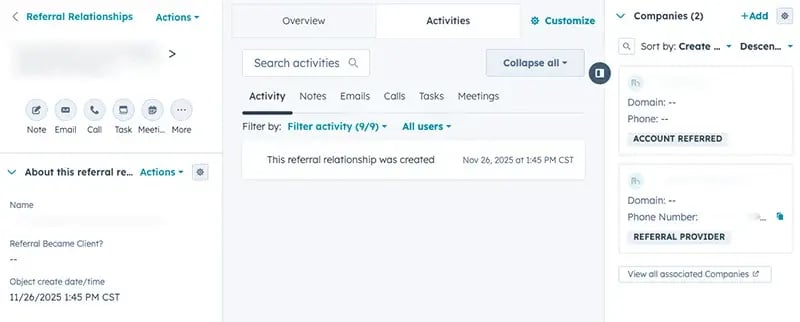
Instead of forcing this into associations, we introduced a Custom Object for Referrals—giving structure, clarity, and control over how referral relationships were tracked.
The Setup
What we built:
- A Referral custom object to represent each referral instance
- Flexible associations to support:
- Patient → Patient referrals
- Physician → Patient referrals
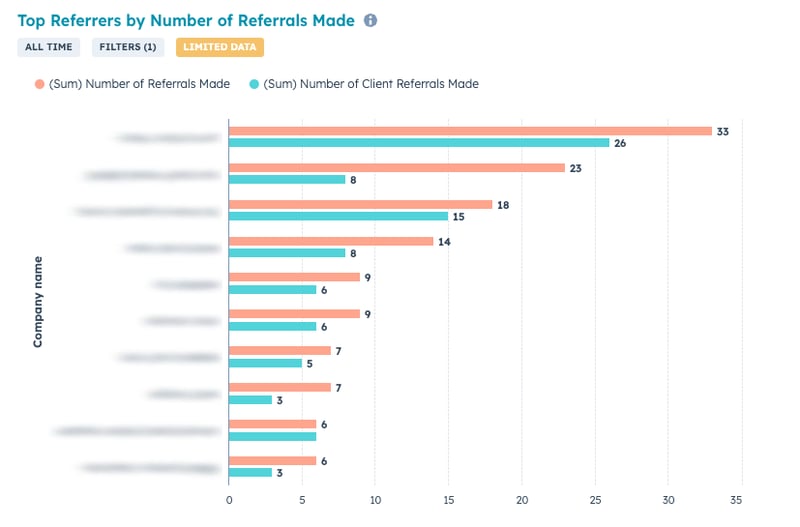
- Custom properties to track referral activity and counts per contact
The Engine
To make the process scalable and seamless, we also introduced a custom referral link system.
How it works:
- Each physician is assigned a unique referral URL
(generated via calculated property using their record ID) - When a patient submits through that link, the system:
- Automatically creates the referral record
- Associates the correct referrer and referral
- Stores the relationship with full context
The Impact
This turned a messy, incomplete data sync into a structured and scalable referral system.
- Referral relationships are now clearly defined and reportable
- Salesforce receives meaningful, contextual data—not just associations
- The team can track referral volume by contact or physician
- Automation can now trigger based on referral activity
- Manual processes for tracking referrals were eliminated
Most importantly, the client now has a reliable system of record for referrals, which wasn’t possible with standard associations alone.

FAQ
Can HubSpot automatically assign unique referral links to contacts or physicians?
Yes — and once it's set up, every new physician and patient gets one automatically without any manual work.
HubSpot's calculated properties can generate unique referral URLs dynamically using a contact's record ID, eliminating the need to manually create or distribute tracking links. This system was built to handle referrals from both physicians and patients — and on the patient side, HIPAA anonymity requirements meant referral links needed to identify the referrer without exposing any personal information. Using the record ID as the basis for the calculated URL solved for this directly: each link is unique and fully trackable, but contains no identifying patient data. When someone submits through that link, HubSpot automatically creates the referral record, associates the correct referrer, and stores the full relationship context. As a HubSpot Diamond Solutions Partner, Simple Strat designs these systems to be both compliant and scalable — so they work reliably from day one without ongoing manual intervention.
How do you track referral sources in HubSpot when contacts are syncing to Salesforce?
The answer isn't always syncing more data — sometimes it's being deliberate about what you keep in HubSpot.
When HubSpot contacts sync to Salesforce, standard contact-to-contact associations can create noise on the Salesforce side — arriving without context or relationship clarity. In this case, the right architectural decision was to build referral tracking on a dedicated HubSpot Custom Object and intentionally prevent those referral associations from syncing to Salesforce. This keeps the referral system clean and structured within HubSpot, where it can power reporting and automation, without introducing messy or uninterpretable data into Salesforce. The result is a clearer separation of concerns: Salesforce gets the contact data it needs, and HubSpot owns the referral relationship layer.
How does a HubSpot Diamond Solutions Partner approach custom object architecture for complex sales or referral processes?
They design with the end in mind — so the system you build today can prove its value tomorrow.
Custom Objects add complexity to HubSpot, and that tradeoff is only worth it if the architecture is built to deliver measurable business outcomes from the start. For this healthcare client, the goal wasn't just to track referrals — it was to drive more referral business from both patients and physicians, and to have the data to prove it was working. Simple Strat designed the Custom Object schema with specific properties built in to support referral volume reporting, so leadership could see which referral sources were performing and make decisions accordingly. As a HubSpot Diamond Solutions Partner, we don't just build for the immediate problem — we build so the system can show its own ROI.