Management Consulting
Understanding SQL to Opportunity Conversion Rate by Email
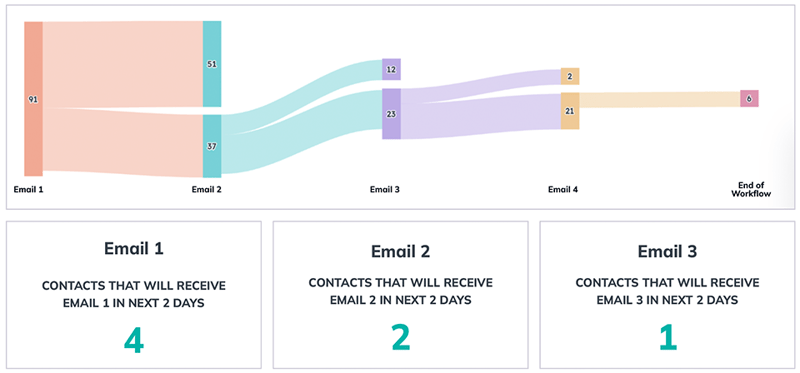
Simple Strat configured HubSpot Journey Analytics Reporting to track each step of an email drip sequence from SQL to booked meeting, segmented by marketing source, giving leadership a live view of conversion rates by email and a calculable forecast of upcoming conversions in each delay period.

The Challenge
The client struggled with:
-
Unclear SQL-to-opportunity conversion rates, leading to unreliable forecasting
-
No visibility into the number of contacts at each funnel stage, making it hard to spot bottlenecks
-
No easy way to compare current funnel data to historical performance, leaving trends unnoticed
-
Difficulty forecasting upcoming conversions, putting revenue targets at risk
The Solution
We implemented a custom solution with Journey Analytics Reporting.
-
Set up SQL-to-Opportunity funnels segmented by marketing source
-
Mapped out each step in the email drip campaign, tracking the journey from receiving the first email to booking a meeting and becoming an Opportunity
-
Used Journey reporting to link emails with “exits” at each step, creating a clear view of the conversion rate by email for each funnel
-
Leveraged Marketing email activities data and custom reporting to identify contacts waiting in each delay period, allowing calculation of expected upcoming conversion
The Impact
Client can now:
-
Accurately forecast the number of contacts likely to convert in the upcoming days
-
Better visibility into funnel performance, allowing better business management decisions, such as staffing and budget adjustments
-
New reporting capabilities, providing valuable insights to business leaders

FAQ
How can HubSpot show which email in a drip sequence is causing the most drop-off in an SQL nurture campaign?
Journey Analytics Reporting maps each step of the email sequence and shows how many contacts exited at each stage, making it straightforward to identify which email is losing the most people before they convert.
Each step in the Journey report corresponds to an email or action in the sequence. The report shows entries, exits, and conversion rates at every step, so the team can see not just how many SQLs became opportunities overall, but exactly where in the sequence they dropped off. This changes the conversation from "our conversion rate is too low" to "email three is where we're losing people", which is a problem the team can actually solve. For marketing teams optimizing nurture campaigns, this level of step-by-step visibility is what makes iteration data-driven rather than directional.
Can HubSpot forecast how many SQLs are likely to convert in the next few days based on where they are in a sequence?
Yes — by identifying how many contacts are currently sitting in each delay period of the workflow, and applying the known conversion rate for each step, you can calculate expected upcoming conversions with reasonable accuracy.
The approach uses marketing email activity data to identify contacts waiting in each delay window, then applies the historical conversion rate for the next step to estimate how many will move forward. The result is a near-term forecast that's grounded in actual funnel behavior rather than top-level averages. For sales teams that need to anticipate pipeline volume by the week, this gives them something specific to plan against. Simple Strat, a HubSpot Diamond Solutions Partner, builds these Journey Analytics configurations for B2B teams that need their CRM reporting to answer forward-looking questions, not just historical ones.
What's the difference between standard HubSpot funnel reports and Journey Analytics Reporting?
Standard funnel reports show volume at each stage. Journey Analytics shows the path contacts actually took to get there, including which emails they received, where they exited, and how long each step took.
A standard funnel report will tell you that 40 SQLs became 18 opportunities last quarter. Journey Analytics tells you that 12 of those conversions came from contacts who received email two and booked a meeting within two days, while email three consistently produces exits. That's actionable data that a volume report can't surface. For teams running multi-step nurture sequences, the difference between knowing your conversion rate and knowing why it is what it is determines whether optimization is possible at all.