Software
Doubling Data Coverage on Custom Objects With Sync Properties
Simple Strat replaced 42 HubSpot workflows with sync properties linked to the main contact record, doubling data coverage across all associated custom objects and removing the dependency on manual workflow maintenance.

The Challenge
The client keeps a set of data on contact records that also needs to live on each of their associated custom objects. Several legacy workflows handled the copying, but every new property meant someone had to remember to update those workflows. Anyone adding a property had to know the workflows existed in the first place. As properties were added over time, gaps started showing up — data that existed on the contact but never made it to the custom object.
With 42 workflows managing this copying across multiple custom objects, the process had become difficult to maintain and easy to get wrong. The more the system grew, the more it depended on institutional knowledge that not everyone on the team had.
The Solution
The core problem was that the data path was too indirect. Workflows copying properties between objects work, but they require ongoing maintenance and create opportunities for human error every time something changes. Sync properties offered a more direct connection that stays current automatically without anyone having to update a workflow.
The Setup
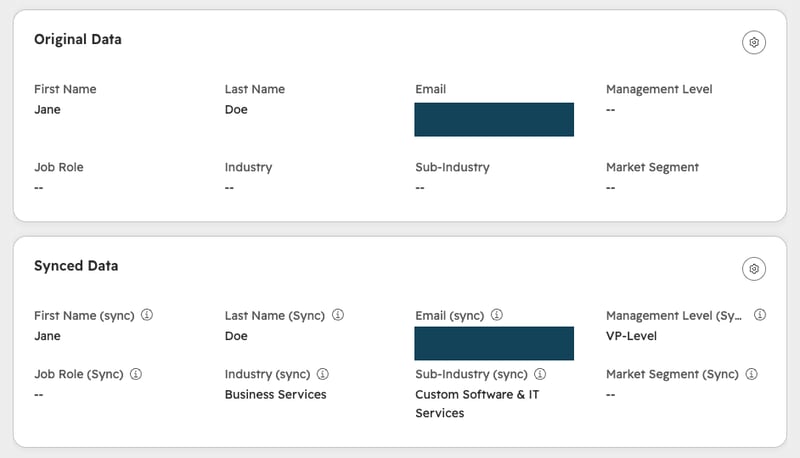
Sync properties were configured on every custom object, each linked to the main contact record. Rather than a workflow reading a contact property and writing it to a custom object, sync properties keep a custom object’s value matched to the contact’s automatically. The data moves straight from the contact record without any intermediate steps.
The Engine
With sync properties handling the copying, adding a new property to the contact no longer requires updating a workflow.
As long as the property is included in the sync configuration, it flows to the custom object automatically. The 42 workflows that had been managing this (either as standalone flows or individual actions within larger workflows) were archived or removed.
The Impact
Data coverage on the client’s custom objects doubled.
Properties that had been missing from custom object records because a workflow was never updated to include them are now populated. The team no longer needs to know which workflows exist or remember to update them when something changes. The data path is direct, the coverage is complete, and the workflow library is 42 steps lighter.

FAQ
What are HubSpot sync properties and how do they work with custom objects?
Sync properties create a direct link between a property on one object and a property on an associated object, so the value stays matched automatically without a workflow to copy it.
When data needs to live on both a record and one of its associated objects, whether that’s a contact and a custom object, a company and a deal, or any other associated pair, the default approach is a workflow that reads one and writes to the other. Sync properties skip that step entirely. Once configured, the custom object property stays in sync with the contact property it’s linked to — any update on the contact reflects on the custom object automatically. There’s no workflow to trigger, no action to maintain, and no dependency on someone knowing the copying logic exists. As a HubSpot Diamond Solutions Partner, Simple Strat uses sync properties when the goal is reliable, low-maintenance data consistency across associated records rather than conditional copying that requires ongoing upkeep.
When should you replace HubSpot data-copying workflows with sync properties?
When the workflow’s only job is moving a value from one object to another with no conditions, sync properties do the same thing more reliably and without the maintenance overhead.
Data-copying workflows are often the first solution teams reach for because they’re familiar and flexible. But when a workflow exists purely to keep two properties in sync — no branching, no conditions, just copy this value to that record — it introduces unnecessary complexity. Every new property that needs copying requires someone to update the workflow, and anyone who doesn’t know the workflow exists will create gaps without realizing it. Sync properties remove that dependency entirely. They’re the right tool when the relationship between the two values is straightforward and consistent. Simple Strat audits workflow libraries for this pattern when clients are experiencing data gaps or struggling to keep copying logic up to date as their property sets grow.
How do you fix data gaps on HubSpot custom objects when properties aren’t being copied consistently?
Audit which properties are missing from custom object records, trace them back to how the copying is being handled, and replace workflow-based copying with sync properties where the relationship is direct.
Data gaps on custom objects usually trace back to a maintenance problem rather than a configuration error. A workflow was set up to copy specific properties, new properties were added later, and nobody updated the workflow to include them. Over time those gaps compound. The fix starts with identifying which properties exist on the contact but are missing from the custom object, then replacing the workflow logic with sync properties that handle the relationship automatically going forward. For existing records with gaps already in place, a one-time backfill is typically needed to bring historical data into alignment. Simple Strat approaches custom object data quality by eliminating the manual steps that create gaps in the first place, so the problem doesn’t recur as the property set continues to grow.
Last updated: October 22, 2026