Manufacturing
How to Create Upsell Leads From HubSpot Orders Automatically
Simple Strat used HubSpot segments and a custom-coded workflow action in Data Hub to turn qualifying ecommerce orders into Leads, associated to the right contact and company with SKU and quantity attached, ready for the sales manager to assign.

The Challenge
For this B2B client, orders from their ecommerce store are some of their best upsell opportunities. When a customer self-serves for certain products or orders a large enough quantity, that customer is a strong fit for a rep to follow up with a quote on a complementary product. The client had a system of quantity and keyword alerts built to catch those orders, but it lived in a third-party system, and the logic was maintained by a technical team that had other projects waiting.
That setup made it hard for the sales side to see when these signals were happening, and harder to change the rules. All the customer and ownership data the reps needed already lived in HubSpot, but the alerts did not. Every adjustment to the logic meant getting in line for technical help.
The Solution
The client wanted to keep the logic they had, make a few improvements along the way, and move the whole process into HubSpot where the sales team could see it and adjust it themselves.
The Setup
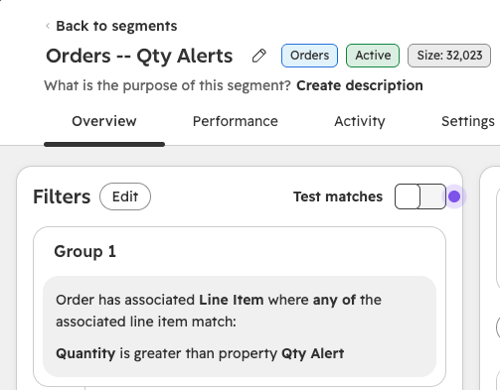
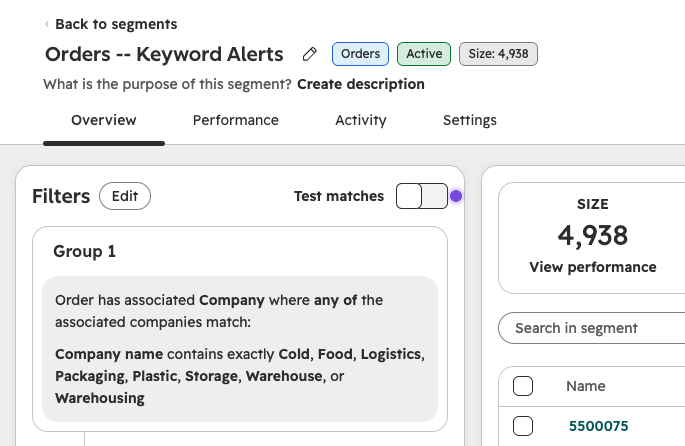
Two segments of Orders now do the monitoring. One enrolls orders containing a line item with a quantity above the Qty Alert property already set on each Product. The other enrolls orders based on keywords. Instead of building the keyword rules into code, they live in a segment filter, so the sales manager can add or remove terms without touching the automation or asking anyone for help.
The Engine
Orders that land in either segment enroll in a workflow in Data Hub. A custom-coded action analyzes each incoming order and creates a Lead from it, which HubSpot can’t do from an Order without code. The Lead is associated to the contact and company that placed the order and carries the SKU and quantity ordered, so the sales manager has what they need to assign it. From a single Leads view, the manager assigns each lead to a rep in a few clicks.
Two Status options keep reps on the right accounts. “Cooling Down” marks companies where an upsell was already attempted in the last six months, and “Exempt” marks companies the client doesn’t want to upsell now or in the future.
The Impact
The client moved an entire alerting process out of a system their sales team couldn’t change and into the CRM they use every day.
New upsell leads show up in one place, tied to the right contact and company, with the order details attached. Keyword criteria can be updated by the sales manager in a segment filter. The technical team is free for other work. And because the leads, orders, and statuses all live in HubSpot, the client can report on upsell activity far more easily than before.

FAQ
Can HubSpot automatically create a Lead from an Order?
Not natively, but a custom-coded workflow action in Data Hub can read an Order and create an associated Lead automatically.
HubSpot doesn’t offer a standard workflow action for creating a Lead from an Order record. A custom-coded action closes that gap. It can read the order details, create the Lead, associate it to the contact and company that placed the order, and pass along information like SKU and quantity so the person assigning the Lead has context. Because the action runs inside a standard workflow, enrollment can be controlled with segments or other triggers. As a HubSpot Diamond Solutions Partner, Simple Strat builds these actions for teams that want ecommerce order data to drive sales follow-up directly in the CRM.
How do you identify upsell opportunities from ecommerce orders in HubSpot?
Use segments to flag orders that meet your criteria, such as quantity thresholds or product and company keywords, then enroll them in a workflow that creates follow-up for your sales team.
Two kinds of signals work well for upselling. The first is quantity: an order with a line item above a set threshold, such as a Qty Alert property on the Product, suggests a buyer who may be ready for a larger or complementary purchase. The second is keywords, such as terms in a company name or product that indicate a good fit. Building each as a segment keeps the rules visible and editable by the sales team, and enrolling matching orders in a workflow turns each signal into an action. Simple Strat helps clients structure these rules so non-technical team members can maintain them without developer support.
How do you keep reps from repeatedly pitching the same customer in HubSpot?
Add a status property to your leads or companies that marks accounts as recently contacted or permanently excluded, and use it to filter or suppress future outreach.
When automation creates a lead every time an order meets the criteria, the same customer can end up in front of reps again and again. A status property solves this by recording what already happened. A “Cooling Down” value can flag accounts where an upsell was attempted within a set window, such as six months, and an “Exempt” value can exclude accounts the business never wants to upsell. Reps can see the status in the Leads view and skip accounts that aren’t worth another attempt, and the business keeps control over how often customers are approached.
Last updated: November 03, 2026