Construction
Using a Rollup Property to Fix Broken Workflow Re-enrollment
Simple Strat built a rollup property on a custom inventory object to give a construction equipment client a reliable, re-enrollable workflow trigger whenever a deal moves to the sold stage.

The Challenge
This client sells used farm and construction equipment, and every piece on their lot is stored as a custom object in HubSpot. When a unit gets attached to a deal, and that deal closes, the inventory needs to be labeled as sold. It sounds simple. But the way deals actually close in their business made a deal-based workflow unreliable almost immediately.
Sometimes a salesperson forgets to add a second piece of equipment until after the deal is already in or past the sold stage. Sometimes inventory gets swapped out at the last minute. A deal-based workflow had no way to handle those situations because while HubSpot does allow re-enrollment on deal-based workflows, it doesn't support re-enrollment based on associated object properties. The first time a piece of inventory missed the trigger, the label didn't get applied, and the system had no way to catch it automatically.
The Solution
Switching the workflow to be inventory-based made sense, since the inventory object is what actually needed the label applied. But that introduced a new problem: the workflow needed a signal from the associated deal, not from anything on the inventory record itself.
Something on the inventory object itself had to update when a linked deal entered the sold stage, and whatever that solution was, it also needed to support re-enrollment so inventory could be relabeled if a deal was later lost or a piece of equipment was removed from it entirely.
The Setup
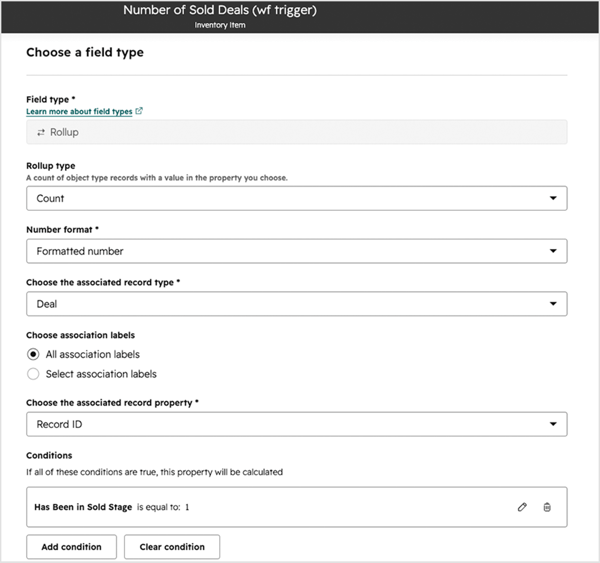
A rollup property was built on the inventory object to count the number of associated deals that had reached the sold stage. To drive the rollup, a calculated field was built on the deal record that checks the "date entered sold" field and outputs a 1 any time that date is known. When a deal moves to sold, the rollup recalculates on every piece of inventory linked to that deal.
The Engine
Because the rollup recalculates every time the association changes, the system handles the messy scenarios automatically. Multiple pieces of inventory on the same deal each get their own rollup update and their own workflow trigger. If a piece of inventory is removed from a deal after closing and added to a different one, the property updates again and the record re-enrolls without anyone having to intervene.
The Impact
The right deals move forward, and the right inventory gets labeled.
Inventory that would have slipped through the process because of a late addition or a last-minute swap now gets caught automatically. The sold label applies correctly, sales reps don’t have to remember to manually flag anything, and the system holds up even when deals get complicated. The edge cases that used to require manual cleanup just don’t need it anymore.

FAQ
Why can’t you just use a deal-based workflow to label inventory when a deal closes?
You can, and it works in most cases. The problem shows up when deals don’t close in a straight line.
HubSpot does allow re-enrollment on deal-based workflows when the trigger uses deal properties, but re-enrollment based on associated object properties isn't supported, which means if something changes on associated inventory after the deal closes, the workflow won't fire again. For a business where inventory gets added late, swapped out, or associated to deals after the fact, that’s a real problem. The workflow fires once, the label doesn’t apply to the new or swapped inventory, and someone has to catch it manually. Switching to an inventory-based workflow gets around the re-enrollment limitation, but requires a property on the inventory object to change when the associated deal enters the sold stage. That’s what the rollup property provides. Simple Strat solves this kind of automation edge case for clients whose real-world processes don’t fit neatly into HubSpot’s default workflow logic.
What is a rollup property in HubSpot and when should you use one?
A rollup property counts or aggregates data from associated records, so a change on one object can automatically trigger something on another.
Rollup properties pull data from associated records and surface it as a calculated value on the parent object. The most common use case is counting things: how many deals are associated to a company, how many tickets a contact has opened, how many pieces of inventory are linked to a sold deal. What makes them useful for workflow automation is that they update automatically whenever the underlying associations or conditions change. That update can then serve as a workflow enrollment or re-enrollment trigger, which is especially useful because associated object properties can't be used for re-enrollment on their own. Simple Strat uses rollup properties when a workflow needs to respond to something happening on a related record, rather than on the record itself.
How do you handle HubSpot workflow re-enrollment when standard triggers aren’t enough?
Re-enrollment issues usually mean the workflow is built on the wrong object or the wrong trigger property.
When a workflow keeps missing records or failing to fire on edge cases, the first thing to check is whether the workflow is centered on the right object. A workflow built on deals can’t re-enroll when something changes on associated inventory. A workflow built on contacts can’t respond cleanly to ticket updates. Moving the workflow to the object that actually needs the action applied, and using a property on that object as the trigger is usually the cleanest fix. If no native property updates when you need it to, a rollup property built to count or aggregate from an associated object can create that signal. Simple Strat diagnoses re-enrollment issues by tracing the workflow logic back to the object and trigger property, then rebuilds from there when the current setup can’t support reliable automation.