Management Consulting
Fixing 4,700 Unassociated Contacts With One Workflow
Simple Strat built a custom-coded fuzzy match workflow in HubSpot that automatically associates contacts to Company records using Company Name instead of email domain, eliminating manual lookup for every personal email submission.

The Challenge
The client takes in a lot of form submissions from people using personal email addresses — Gmail, Hotmail, Yahoo. HubSpot's native company association relies on email domain to do its work, so when a personal address comes through, the association never happens. The form itself captured a Company Name field on the contact record, but that data was sitting there unused. Nobody was telling HubSpot to do anything with it.
With more than 4,700 contacts sitting in that gap, the manual workload wasn't something the team could keep absorbing. Someone had to search for the right Company record and make the association by hand, one contact at a time. As form volume grew, the problem kept compounding.
The data to solve it was already there. It just needed something to act on it.
The Solution
The answer was to bypass email domain entirely and build an association process around the Company Name field the form was already capturing. The challenge was that company names on form submissions rarely match Company records exactly. Legal suffixes, punctuation, abbreviations, and shorthand all create enough variation that a simple string match would miss too many.
The Setup
A custom-coded workflow action was built in Node.js that triggers off the Company Name contact property instead of email domain. Before any matching happens, the name gets normalized — legal suffixes like "Inc," "LLC," and "Corp" are stripped out along with punctuation, so what gets compared is just the meaningful part of the name.
From there, the action searches existing Company records using HubSpot's CRM Search API and scores each candidate using a blend of token overlap and string similarity. Something like "Northwind Logistics Solutions LLC" on the contact record can still be matched confidently to a Company simply named "Northwind."
The Engine
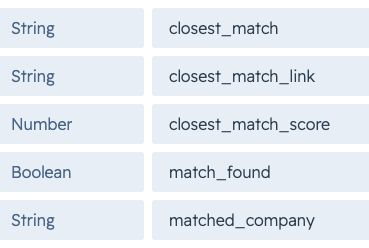
The output of that scoring feeds five custom properties on the contact record: closest match name, closest match link, closest match score, a match found boolean, and the matched company name. Based on the confidence score, the workflow branches automatically.
Contacts above the threshold get associated to the matched Company record without anyone touching them. Contacts below the threshold trigger a notification that includes the contact's details, the closest match found, and a direct link to that Company record so a team member can confirm the association with one click instead of searching from scratch.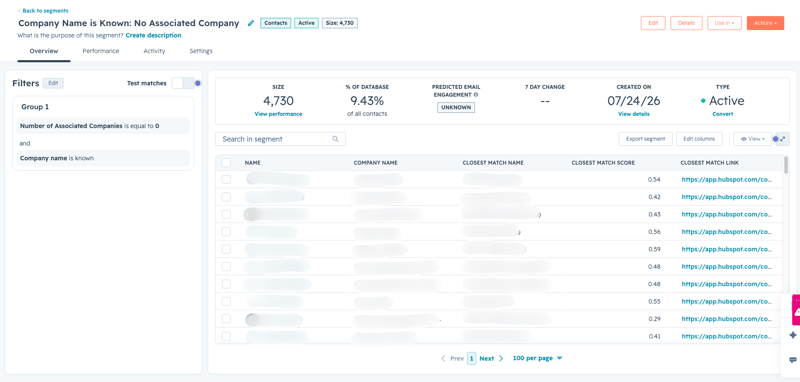
The Impact
The 4,700 contacts that used to require manual lookup either get resolved automatically or land in someone's inbox with the answer already mostly done.
The manual process that had been eating up time on every personal email submission is gone for high-confidence matches. For lower-confidence ones, the team isn't starting from scratch. They're confirming a suggestion.
The workflow handles both scenarios without anyone having to decide which contacts need attention and which don't. As form volume grows, the system scales with it.

FAQ
Why doesn't HubSpot automatically associate contacts to companies when a Company Name is captured on the form?
HubSpot's native company association works off email domain, not the Company Name field, so personal email submissions fall through no matter what other data the form collects.
HubSpot creates and associates Company records by reading the domain of the contact's email address and matching it against existing Company records or creating a new one. That process works well for business email addresses, but personal domains like Gmail, Hotmail, and Yahoo don't map to any Company record. Even if the form captures a Company Name field, HubSpot doesn't use that field for association natively. The data sits on the contact record with no connection made. Fixing this requires a custom solution that reads the Company Name field directly and builds the association from there. As a HubSpot Diamond Solutions Partner, Simple Strat builds these kinds of workarounds for clients whose lead sources don't fit HubSpot's default association logic.
What is fuzzy matching and why does it matter for CRM data quality?
Fuzzy matching finds records that are similar enough to be the same thing, even when the names don't match exactly, which is almost always the case with real-world form submissions.
Exact string matching breaks down quickly with company names because people write them differently every time. Legal suffixes, abbreviations, punctuation, and informal shorthand all create variation between what a contact types on a form and what lives in your CRM. Fuzzy matching accounts for that variation by scoring candidates on how similar they are rather than requiring a perfect match. A blend of token overlap and string similarity gives you the flexibility to catch obvious matches that an exact comparison would miss, while a confidence threshold keeps the auto-association from making connections that aren't actually reliable. Simple Strat uses this approach to keep CRM association accurate without requiring manual review of every record.
How do you handle company association when the match isn't confident enough to automate?
Rather than skipping low-confidence matches entirely, the workflow surfaces the best candidate to a team member with everything they need to confirm it in one click.
The goal isn't to automate every association, but to eliminate unnecessary manual work. For contacts where the confidence score is high, the association happens automatically. For contacts where it isn't, the workflow sends a notification that includes the contact's details, the closest Company match found, and a direct link to that record. The team member doesn't have to search for anything. They review the suggestion and confirm or dismiss it. That distinction between auto-resolve and assisted review is what makes the system practical at scale, because it applies the right level of human judgment where it's actually needed rather than requiring it everywhere. Simple Strat builds this kind of branching logic into custom workflows so automation handles what it can and humans handle what it can't.