Financial / Insurance
Tracking Invited, Registered, and Attended in One Report
Simple Strat applied campaign-based association labels in HubSpot, giving a financial services client one repeatable report for invited, registered, and attended counts across every in-person event.

The Challenge
This financial services client invests in events regularly, but had no way to see how many people they invited actually showed up. They could see registrations. They could see who attended. Invited counts were missing entirely, and that gap existed in both Eventbrite and HubSpot's Marketing Event object. Even with an event platform built for this exact purpose, there was no native way to track who had been invited in the first place.
With multiple events running throughout the year, building a custom report for each one wasn't realistic. The client needed something that worked the same way every time, regardless of which event it was tracking. Without invited counts, there was no way to calculate the metric that actually mattered to them: cost per new lead generated from these events. Registration and attendance numbers told part of the story, but not the part that would tell them whether the investment was paying off.
The data they had wasn't wrong. It just wasn't complete.
The Solution
The fix came down to association labels, a capability that wasn't always available the way the client needed it. Association labels between campaigns and other objects existed, but only as a manual process at first, which wasn't useful for something meant to repeat across dozens of events. Once that functionality became available through workflows, the pieces were in place to build something that would scale across every event going forward.
The Setup
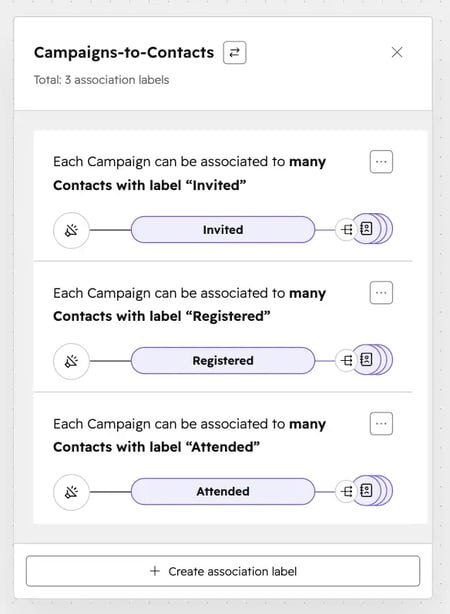
The client already creates a campaign for every marketing event, along with the pre- and post-event assets tied to it. That existing structure became the foundation. The campaign ID was used to apply labels for invited, registered, and attended directly to contacts, with workflows handling the labeling automatically as contacts moved through each stage. No manual tagging, and no new process for the team to learn for each individual event.
The Engine
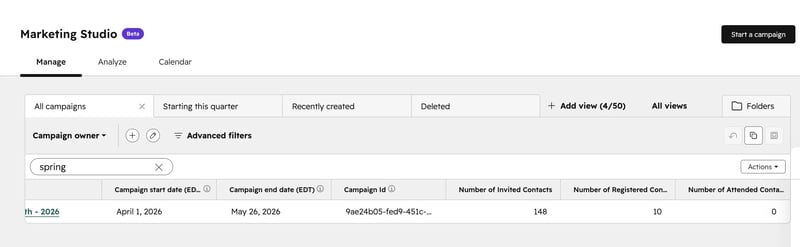
Rollup properties were built to count how many contacts carried each label, turning individual association labels into a clean, countable metric per event. Because every event runs through the same campaign structure, the same labels and rollups apply automatically, regardless of how many events happen in a given quarter. One process now works for all of them.
The Impact
The client now has a single report showing invited, registered, and attended counts across all events, with the ability to drill into any individual event for a closer look.
For the first time, they can connect event attendance to the data already living in HubSpot. That connection opens the door to the question they were really trying to answer all along: ‘Are these events generating leads, and at what cost?’ With invited, registered, and attended counts now visible side by side for every event, the client has the foundation to calculate cost per new lead and measure events the same way they measure every other channel.

FAQ
Can HubSpot track how many people were invited to an event, not just who registered?
Not natively, and not through Eventbrite either. You have to build the tracking yourself using association labels and rollup properties.
HubSpot's Marketing Event object tracks registration and attendance well, but it has no built-in field for invited counts. Most event platforms have the same gap. The workaround uses campaign-to-contact association labels, a beta feature that lets you tag contacts as invited, registered, or attended based on the campaign tied to your event. Rollup properties then count how many contacts carry each label, giving you a usable metric without building a separate report for every event. Simple Strat builds this kind of reporting for clients running events regularly, so the process scales without extra manual work each time.
How do you calculate cost per lead for in-person events in HubSpot?
First, you’ll need the invited, registered, and attended counts in one place. Without all three, cost per lead is a guess, not a number.
Most teams can see registration and attendance, but invited counts are the missing piece that makes the rest of the funnel meaningful. Once you have all three numbers tracked consistently across events, you can divide total event spend by new leads generated to get a real cost per lead figure, and compare that figure across events to see which formats or topics are actually performing. The hard part isn't the math. It's getting clean, consistent, invited, registered, and attended data in the first place. Simple Strat helps clients build that reporting foundation so the cost-per-lead conversation is backed by real numbers instead of estimates.
What are HubSpot association labels and how can they be used for campaign reporting?
Association labels let you tag the relationship between a campaign and a contact, like invited or attended, instead of just connecting the records with no context.
Campaign-to-contact association labels are a newer HubSpot capability that lets you define the nature of the relationship between a campaign and a contact, rather than just linking the two records. For event reporting, that means a single campaign can carry contacts labeled as invited, registered, or attended, all tracked separately but tied to the same event. Pairing those labels with rollup properties turns them into countable metrics you can report on without manual tallying. Because the labels can now be applied through workflows, the entire process runs automatically as contacts move through each stage of the event lifecycle. Simple Strat works with clients to apply capabilities like this as soon as they become workflow-ready, often solving reporting gaps that didn't have a clean answer before.