Manufacturing
Using an AI Agent in HubSpot to Find Out Why Deals Are Lost
Simple Strat ran an AI agent in HubSpot against a year of closed-lost deals, surfacing stale quotes, weak loss reasons, and coaching opportunities in under a minute, then turned the findings into concrete pipeline changes.

The Challenge
This small business had a gut feeling that too many deals were being lost or going stale, but nobody could say why. Deal velocity and time-in-stage reports showed pieces of the picture, but reading them one at a time never added up to an explanation. The team also wanted to get more value out of the data already sitting in HubSpot, and to give their users better information to work from.
The question wasn’t whether there was something to learn from the lost deals. It was where to look first.
The Solution
Instead of building another report, the team ran a Deal Loss Agent in HubSpot against the closed-lost deals. The agent reads across the whole cohort at once, so it can connect loss reasons, time in stage, rep notes, and key pipeline properties that separate reports tend to treat on their own.
The Setup
The agent analyzed every deal that closed lost in 2026, a cohort of 166 deals worth about $1.84M. Properties the pipeline already requires were included in the analysis. This client runs two distinct brands, for example, so the agent factored brand into its findings.
The Engine
In under a minute, using the HubSpot credits already included with the account, the agent produced an executive summary of what was driving the losses:
-
Vague loss reasons: 62 deals, or 37%, were closed lost with the reason “Other.”
-
Slow quotes: Deals averaged about 151 days in the Quote Sent stage, far longer than any earlier stage.
-
Disengaged buyers: Rep notes repeatedly mentioned customers who were “ghosted” or gave “no response.”
-
Returning clients: 77 losses, roughly 46% of the cohort and more than $1.27M in value, were returning clients.
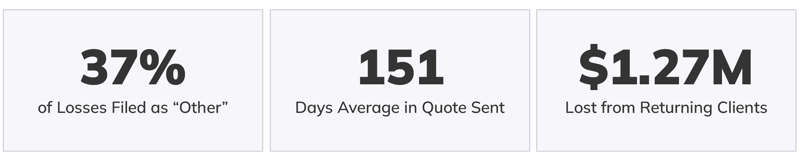
It also compared closed-lost count and revenue quarter over quarter, called out coaching opportunities for individual reps based on the trends in their deals, and recommended success metrics to track.
The Impact
The agent turned a year of lost deals into a short list of changes the team could act on right away:
-
Follow-up on stalled quotes: A task is created for the deal owner four days after a deal lands in Quote Sent with no follow-up. Because this client works with high-profile customers, a task fit better than an automatic email.
-
A close threshold: Deals that sit too long are flagged to be closed, either automatically or manually, which keeps the pipeline clean.
-
A deal view for silent deals: Open deals with several days of no incoming communication are easy to find.
-
Better closed lost reasons: The agent pointed out which reasons weren’t working and which new options to add, based on what reps typed in the notes after choosing “Other.” Future losses will be much easier to analyze.
-
Success metrics: The team is working to reduce the average time in Quote Sent from about 151 days, reduce the number of deals that sit past 90 days, and reduce “ghosted” and “no response” losses.
The quarter-over-quarter view also opened a conversation about employee turnover and cleanup efforts throughout the year.
For a small business, getting this kind of analysis in a minute makes every credit and every dollar go further. Pairing it with a HubSpot expert who interprets the findings, picks the changes that make sense, and implements them turns a report into a plan.

FAQ
How can you find out why deals are being lost in HubSpot?
Analyze your closed-lost deals together, looking at loss reasons, time in stage, and deal notes at the same time instead of in separate reports.
Deal velocity and time-in-stage reports each show one dimension of a lost deal, so it’s easy to see that something is wrong without seeing why. An AI agent can read across the closed lost reason, stage durations, rep notes, and key pipeline properties in a single pass, then summarize the patterns behind the losses. That might include stages where deals stall, reasons that aren’t being captured, or groups of customers that churn more than others. As a HubSpot Diamond Solutions Partner, Simple Strat helps teams run this kind of analysis and then turn the findings into pipeline changes.
How do you fix a closed lost reason property that has too many “Other” responses?
Review the free-text notes reps entered alongside “Other,” group them into recurring themes, and add those themes as new closed lost reason options.
When a large share of losses is filed under “Other,” the property isn’t giving you anything to analyze. In one recent review, more than a third of closed-lost deals fell into that category. The notes reps add after selecting “Other” usually hold the answer, since the same few reasons tend to show up again and again. Grouping those notes into themes and adding them as dropdown options means future losses get categorized correctly at the point of entry. It also makes quarterly reporting on why deals are lost far more reliable.
How do you reduce deals that stall in a HubSpot pipeline stage?
Set a follow-up trigger for deals with no activity after a few days in a stage, and define a close threshold for deals that stay stale.
Deals that sit in a stage like Quote Sent often stall because nobody is prompted to follow up. A workflow that creates a task for the deal owner after a set number of days without activity keeps those deals moving. A task works better than an automatic email when the relationships are high-profile and the outreach needs to be personal. A close threshold, either automatic or manual, then clears out deals that have gone cold so the pipeline reflects what’s real. Tracking the average time in the stage and the number of deals that exceed a set age, such as 90 days, shows whether the changes are working. Simple Strat builds these stage-level guardrails for sales teams that suspect deals are slipping through the cracks.
Last updated: November 13, 2026