Health Care
Automating Call Quality Scoring With Data Agent
Simple Strat used HubSpot's Data Agent and a custom-coded workflow action to automatically score consultation calls against four quality criteria, giving a high-volume enrollment team a scalable QA process for the first time.

The Challenge
The client runs a high-volume enrollment team with over 100 consultation calls happening every week. More than casual check-ins, these are the conversations that move someone from interested to sales qualified, and the quality of each call has a direct impact on whether that happens. With that many calls in the queue, their QA process couldn't keep up.
There was no realistic way for a human reviewer to evaluate enough calls to get a reliable read on how the team was performing or which calls were actually moving the needle. The transcripts were there and the data existed, but without a system to process it at scale, most of it was going unreviewed.
The team needed a way to evaluate call quality consistently, across every call, without adding headcount to do it.
The Solution
HubSpot was already capturing transcripts for these consultation calls, which meant the raw material for scoring was already in the system. The question was how to process it automatically and turn it into something the team could actually use.
The Setup
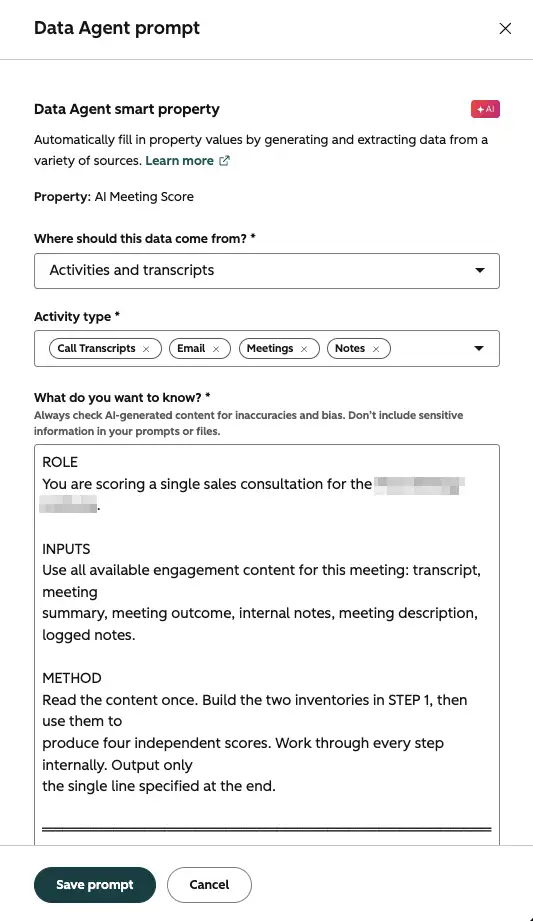
Three approaches were considered: a Data Agent smart property, a custom agent, or a custom Data Agent prompt inside a workflow. The deciding factor was transcript access. Data Agent smart properties were the only option that could read call and meeting transcripts directly, which made the choice straightforward.
The client's team worked out the scoring criteria across four dimensions they wanted to evaluate for each call. Originally, four separate smart properties were built, one for each score component, but working through the logic revealed that a single smart property could handle all four and output them together.
A custom-coded workflow action then parses that single output into four separate score properties on the record, making each dimension individually reportable without requiring four separate Data Agent credits per call. That parsing approach was only possible because the client had access to Data Hub Pro. Without it, four separate smart properties would have been the likely path.
The Engine
The smart property runs through a workflow rather than firing on every meeting automatically. That gives the team control over which specific calls get scored, filtering to the consultation calls that actually matter for QA rather than running on every logged activity. The workflow enrollment criteria define the scope, and the Data Agent does the rest, reading the available transcript content and outputting a score across all four criteria in a single pass.
The Impact
Before this was in place, reviewing call quality at this volume wasn't happening consistently. It couldn't.
Now the scoring runs automatically in the background on every call that meets the criteria. The enrollment team has a foundation to evaluate performance, identify patterns, and train accordingly as the data builds up.
What was previously a manual, incomplete QA process is now systematic, and it scales with call volume rather than against it.

FAQ
Can HubSpot's Data Agent access call and meeting transcripts for AI scoring?
Yes, and transcript access is actually one of the key advantages of using a Data Agent smart property over other AI approaches in HubSpot.
Not every AI option in HubSpot can read transcript data. Data Agent smart properties configured to pull from Activities and Transcripts can, which makes them the right tool when the input for scoring or analysis lives in call logs rather than contact or deal properties. One thing to keep in mind is that smart properties use AI credits per evaluation (10 credits per fill) so pairing them with a workflow that controls which records they run on keeps usage focused on the calls that actually need scoring. As a HubSpot Diamond Solutions Partner, Simple Strat evaluates which AI tooling fits the data source and use case before building, rather than defaulting to one approach for every problem.
How do you turn a single Data Agent output into multiple reportable score properties in HubSpot?
A custom-coded workflow action can parse a single smart property output into as many individual properties as you need, without requiring a separate Data Agent credit for each one.
If you need a Data Agent to evaluate something across multiple criteria, the natural instinct is to build a separate smart property for each one. That works, but it multiplies credit usage with every evaluation. A more efficient approach is to write a single prompt that outputs all criteria together in a structured format, then use a custom-coded workflow action to split that output into individual properties on the record. Each property becomes independently reportable without the cost of running separate evaluations. This approach requires Data Hub Pro to access custom-coded workflow actions. Simple Strat builds these kinds of parsing workflows for clients who want detailed, multi-dimensional scoring without the credit overhead of running the Data Agent multiple times per record.
How do you scale a QA process in HubSpot when call volume is too high for manual review?
Use workflow enrollment criteria to define exactly which calls get scored, so the system evaluates what matters without running on everything.
The challenge with high-volume QA isn't just evaluation, but the filtering. Running an AI scoring process on every logged activity would be expensive and noisy. Defining enrollment criteria in the workflow means only the calls that actually need QA scoring get processed. For an enrollment team focused on a specific type of consultation call, that might mean filtering by call disposition, duration, associated lifecycle stage, or meeting type. The result is a scoring system that's targeted rather than broad, which keeps the output meaningful and the credit usage proportional. Simple Strat designs these workflows so clients get actionable QA data on the calls that matter, not a flood of scores across every logged interaction.
Last updated: October 15, 2026