Health Care
How HubSpot's Data Agent Replaced a Workflow Full of Geographic Logic
Simple Strat used HubSpot's Data Agent to build a smart property that automatically categorizes incoming leads by custom-defined U.S. regions, including market-specific areas like the Bay Area, replacing a fragmented multi-workflow setup with AI that can reason across multiple geographic fields at once.

The Challenge
The client had a region property in HubSpot that was already being populated by multiple existing workflows. It worked well enough for a while, but as their reporting needs evolved, the logic behind it started showing its limits. They needed to expand the number of regions they were working with, factor in more geographic data points, and account for market-specific areas like the Bay Area that the existing setup wasn't capturing.
The problem with rebuilding the workflow approach was the complexity it would require. Multiple location-related properties live on contact records, and engineering a custom-coded workflow action to evaluate all of them accurately would have taken significant time. They needed something that could scan across all of those properties intelligently and deliver a result the same day.
The region property that was supposed to make reporting easier was becoming a maintenance problem instead, and the team needed a faster path to a better answer.
The Solution
Rather than engineering a more complex version of the same approach, the team looked for a solution that could handle ambiguous geographic data intelligently without requiring custom code to do it.
The Setup
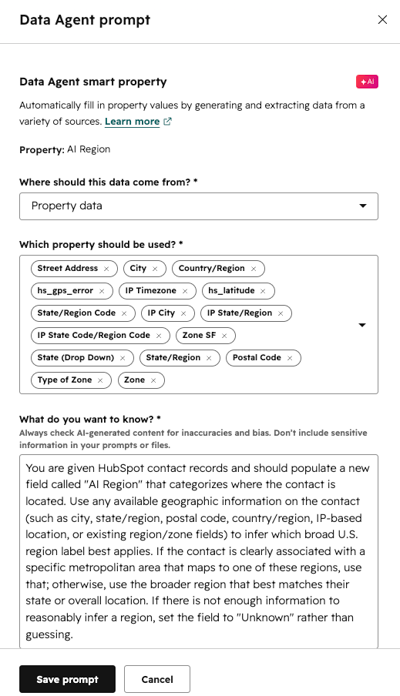
HubSpot's Data Agent made it possible to set up a smart property with a prompt that instructs the agent to look at all available geographic data on a contact record and categorize the contact into the appropriate U.S. region.
The prompt was written to use whatever information was available and apply the regional label that best matched. If there wasn't enough information to make a confident determination, or if the contact was located outside the U.S. entirely, the prompt told it to set the field to "Unknown" rather than guess.
The Engine
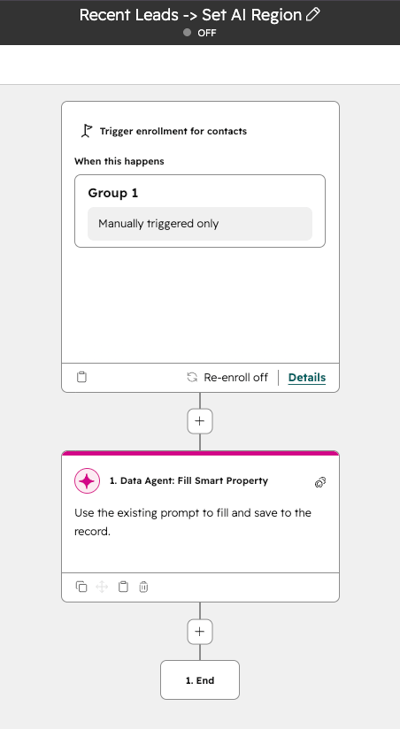
Rather than running the smart property across the entire contact database, it was tied to a workflow so the team could control exactly which records it evaluated. The workflow limits enrollment to incoming leads each month, which keeps credit usage manageable and the output focused on the contacts that actually matter for reporting.
The agent evaluates each new lead as it comes in and assigns the appropriate regional category based on whatever geographic data is present on the record at that time.
The setup later informed a separate custom-coded workflow action built to backfill region data across all existing contacts, since running the Data Agent credits alone across the full database would have been expensive.
The Impact
Every incoming lead now gets a region assigned automatically, without anyone having to touch it.
The reporting that had been held back by inconsistent or missing region data is now reliable. The client can segment and analyze leads by geography the way they actually needed to, across more regions and with more nuance than the original workflow approach allowed. And because the logic lives in a prompt rather than a series of workflow conditions, adding or adjusting regions doesn't require rebuilding anything.

FAQ
What is HubSpot's Data Agent and what can it do with contact properties?
HubSpot's Data Agent is an AI-powered tool that can read existing record data and use it to populate a property based on a prompt you write.
Rather than requiring you to map out every possible condition in a workflow, the Data Agent lets you describe what you want in plain language and lets the AI handle the reasoning. For use cases like regional classification, where multiple fields might need to be considered and the right answer isn't always obvious from a single property, that flexibility is significant. You write a prompt that tells the agent which properties to look at, what values to assign, and how to handle cases where the data is incomplete or ambiguous. As a HubSpot Diamond Solutions Partner, Simple Strat uses tools like the Data Agent when they offer a faster, more maintainable path than building custom logic from scratch.
When does it make sense to use a HubSpot smart property instead of a workflow for data enrichment?
When the logic involves multiple inputs, ambiguous data, or judgment calls that would take dozens of workflow branches to replicate.
Traditional HubSpot workflows are excellent for straightforward if/then logic, but they get unwieldy fast when the number of conditions grows or the inputs are inconsistent. A smart property powered by the Data Agent handles that kind of complexity more cleanly because the AI can reason across all available data at once rather than evaluating one condition at a time. The tradeoff is that smart properties use AI credits, which is why pairing them with a workflow to control which records they run on is usually the right approach. Simple Strat evaluates both options for clients depending on the complexity of the logic, the volume of records involved, and how often the criteria are likely to change.
How do you backfill a HubSpot property across a large contact database without running up AI credit costs?
Use the Data Agent for ongoing enrichment on new records, then handle the historical backfill with a custom-coded workflow action that applies the same logic without the per-record credit cost.
Running an AI smart property across tens of thousands of existing contacts can get expensive quickly if you're paying per credit for each evaluation. A more cost-effective approach is to use the Data Agent for new incoming records going forward, then write a custom-coded workflow action to backfill the property on historical contacts using the same classification logic. The custom code can apply the rules deterministically across the full database in bulk, without the credit overhead. Simple Strat builds these kinds of hybrid solutions when the AI approach is right for ongoing use but the economics don't support running it retroactively at scale.