Software
Automated Download Tracking That Scales With New Content
Simple Strat used HubSpot Custom Events and JavaScript to track individual content downloads on a HubDB-powered gated content page, eliminating the need for manual setup each time new content is published.

The Challenge
A software client used to have every piece of gated content living on its own landing page. That setup made tracking simple. Whoever filled out a form was tied to exactly one piece of content, so the client always knew what people wanted.
A previous agency changed that. They consolidated everything onto a single page behind one master form, which streamlined the page itself but quietly erased the client's visibility into their own content.
The client could still see who filled out the form. They had no way of knowing which specific asset that person actually downloaded. With dozens of pieces of content sitting behind the same form, that gap made it nearly impossible to tell what was resonating and what was being ignored.
The Solution
The first step was understanding how the page actually worked. All of the content was being pulled dynamically from a HubDB table, so every time the client added a new row, a new piece of content appeared on the page automatically. That ruled out going back to individual landing pages, and it ruled out any fix that would require the client to manually update tracking codes every time they published something new.
The Setup
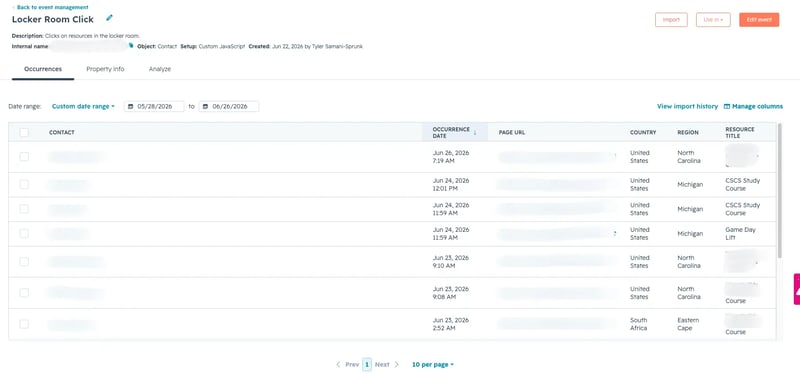
The fix needed to track at the level of individual content, but live inside a system the client would never have to touch. JavaScript paired with HubSpot Custom Events became the way to do that. The idea was straightforward in principle: build something that recognizes when a person clicks a specific asset and logs that click in HubSpot automatically, the moment it happens.
The Engine
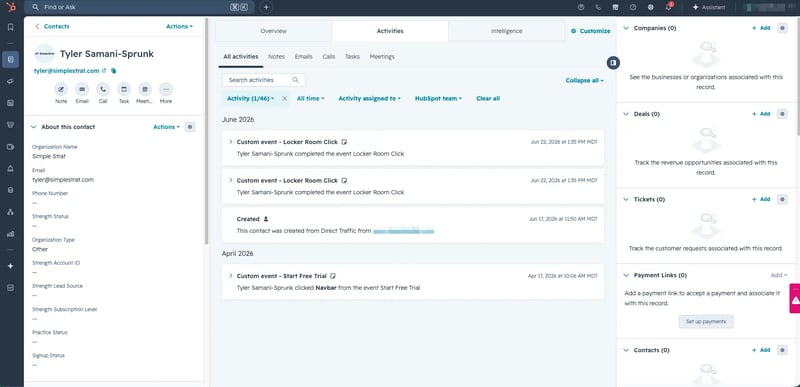
Because the tracking script reads directly from the same HubDB table powering the page, it never needs to be manually updated. Whenever the client adds a new piece of content to the table, the system picks it up automatically and logs a brand-new custom event the moment someone clicks on it. The client doesn't do anything differently when they publish. The tracking just follows.
The Impact
The blind spot the page redesign created is gone, and what came back in its place is more useful than what the client had originally.
The client can now pull accurate reports showing total downloads for every individual piece of content, something that had been impossible since the page consolidation.
That data is already feeding lead scoring and more targeted segmentation. Sales reps can open a contact's record and see exactly which content that person downloaded, sitting right there on the activity timeline, no extra digging required. Visibility didn't just come back. It came back more useful than before.

FAQ
How do you track individual content downloads when gated content is on one page behind a single form?
A single form submission can't tell you which asset someone downloaded, so you have to track the click itself rather than the form.
When multiple pieces of content sit behind one master form, the form submission only tells you that someone showed interest, not which specific asset they wanted. The fix is to track the click on the content itself, using JavaScript paired with HubSpot Custom Events. Each click gets logged as its own event tied to that specific piece of content, giving you the same level of detail you'd get from individual landing pages without going back to building a new page for every asset. Simple Strat builds this kind of click-level tracking for clients whose content libraries have outgrown a one-page-per-asset structure.
What are HubSpot Custom Events and how do they work with dynamic content?
Custom Events let you define and log any specific action a contact takes, so you're not limited to HubSpot's default tracking.
A Custom Event in HubSpot is a behavioral event you define yourself, which means you can log nearly any action a contact takes on your site, not just form submissions or page views. When content is pulled dynamically from a source like a HubDB table, pairing Custom Events with JavaScript lets the tracking stay tied to the table rather than the page. New rows in the table become new trackable assets automatically, with no extra setup needed each time something is published. That data shows up on the contact's activity timeline and feeds directly into reporting, lead scoring, and segmentation. Simple Strat works with software and SaaS clients to build tracking that scales with a growing content library instead of breaking every time it changes.
Can you see what content a contact downloaded directly on their HubSpot record?
Yes, once download activity is logged as a Custom Event, it appears directly on the contact's activity timeline alongside every other interaction.
Once a click is logged as a Custom Event, it lives on the contact's timeline the same way a form submission or email open would, giving sales and marketing a single place to see everything a contact has engaged with. For reps, that means opening a record before a call and seeing exactly which assets that person downloaded, without searching through separate reports. For marketing, it means that the same data rolls up into reporting and can feed lead scoring or segmentation automatically. The goal is for every team to be working from the same picture of what a contact actually cares about. Simple Strat builds this kind of unified tracking so that visibility isn't locked away in a report nobody checks, but visible right where the team is already working.