Education
Tracking Down 38,000 Missing Company Domains With HubSpot AI
Simple Strat built a custom HubSpot AI agent that uses company name and geographic data to search the web for missing domains, placing verified results in a staging property for human review before enrichment, scoring, and segmentation can begin.

The Challenge
About 38,000 companies in this client’s HubSpot database had no domain on record. That gap had downstream consequences across the entire go-to-market operation. HubSpot enrichment needs a domain to find a company, so none of those records could be enriched. Lead scoring that relied on ICP factors couldn’t run on them. Marketing couldn’t segment them for nurture. A large share of the database was sitting outside the work the sales and marketing teams had planned, and it had been that way because there was no practical way to fill 38,000 missing fields by hand.
The Solution
The approach was to build a custom HubSpot AI agent that could use the data already on each record (company name, city, and state) to search the web for the company’s official website. That turned a manual, record-by-record problem into something that could run systematically across the full database.
The Setup
A custom HubSpot AI agent was built to take one company record at a time and use its name, city, and state to search the web for the company’s official website. The agent was built with specific rejection rules to keep results clean: directory and social media pages are rejected, companies with the same name in a different city or state are rejected, and parent organization domains are rejected when the record represents a single location. The agent is limited to two searches per company. If it can’t confirm a match within those constraints, it returns NOT FOUND rather than guessing.
The Engine
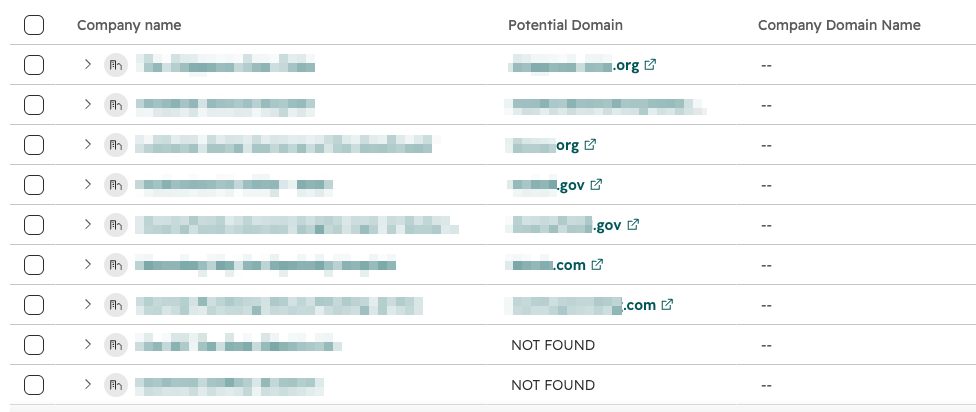
The agent never writes directly to the Company Domain Name property. Results go into a separate Potential Domain property so a person can review each match before it’s copied over.
That review step keeps bad data from flowing into enrichment and scoring. For teams with higher risk tolerance or after initial testing proves reliable, that step can be skipped.
The prompt was also optimized in collaboration with Breeze to minimize the number of credits used per company, keeping the cost of running the agent across a large database manageable.
The Impact
In testing, about half of the enrolled companies came back with an accurate domain — roughly 19,000 records that can now move into enrichment, lead scoring, and segmentation.
Those records weren’t lost. They just didn’t have the one field everything else depended on. With domains now findable at scale, the marketing and sales teams can work with a meaningfully larger share of the database than before. The human review step means confidence in the data stays high as more records are processed.

FAQ
Can HubSpot’s Smart Properties find a company’s domain when none is on record?
Not on their own, Smart Properties need a domain to look up a company, which makes them the wrong tool for this specific gap.
HubSpot’s Smart Properties are built for single-task enrichment requests where the data source already has enough to work from. When the goal is finding a domain that doesn’t exist on the record yet, a Smart Property configured for web research will error because it has nothing to anchor the search to. That limitation is what makes this problem require a different approach. A custom agent can use other available fields — company name, city, state — as inputs for a web search, which a Smart Property isn’t designed to do. The distinction between Smart Properties and custom agents matters: Smart Properties handle straightforward lookups well, and custom agents are better suited for multi-step reasoning tasks where the inputs are incomplete or varied.
How do you use a HubSpot custom agent to find missing company domains at scale?
Build the agent to search using whatever geographic and name data is already on the record, with explicit rejection rules to keep results clean, and route output to a staging property rather than writing directly to the domain field.
The agent takes company name, city, and state as inputs and runs up to two web searches per company. Rejection rules are built into the prompt: directory pages, social media profiles, parent organization domains, and companies with matching names in different locations are all excluded. If two searches don’t return a confident match, the agent returns NOT FOUND rather than guessing. Results go into a Potential Domain property for human review before anything is copied to the Company Domain Name field. That staging step is what makes it safe to run at scale. Approved matches move forward, uncertain ones don’t. As a HubSpot Diamond Solutions Partner, Simple Strat builds custom agents with these guardrails when the data being filled has downstream consequences for enrichment and scoring.
Why does missing company domain data block HubSpot enrichment, lead scoring, and segmentation?
HubSpot enrichment uses domain as the primary lookup key, so records without one are invisible to the enrichment process and to any scoring or segmentation logic that depends on enriched data.
Domain is how HubSpot connects a contact or company record to third-party data sources during enrichment. Without it, the enrichment process has no reliable identifier to match against, and the record stays unenriched. That gap compounds: ICP-based lead scoring that relies on enriched firmographic data can’t run on those records, and segmentation that uses enriched fields to build lists excludes them too. The missing domain isn’t just one empty field — it’s the reason a record is stuck outside most of the automated work the rest of the database benefits from. Filling it is the prerequisite for everything else.
Last updated: October 15, 2026