Other B2B Services
Connecting CSAT Scores to the Tickets That Earned Them
Simple Strat built a two-workflow solution in HubSpot using custom Contact properties to stage Ticket data and bridge it to CSAT survey responses, enabling rep-level attribution and performance reporting.

The Challenge
This client runs a service-heavy operation, and they wanted data to back up what their team already believed: that the work was good.
They’d started sending CSAT surveys after Tickets closed, which should have given them exactly that. But when they went to report on the results, something was missing. The survey responses were coming in, but none of the Ticket data was attached.
The first instinct was to pull the data directly from the Ticket to the survey response. It seemed straightforward, but, CSAT surveys in HubSpot don’t associate to the triggering Ticket the way CES surveys do, so there was no direct path to create it.
The Solution
Since there was no direct path from the Ticket to the survey response, we used the Contact record as the bridge since it was associated to both.
By staging Ticket data on the Contact first, it became accessible to the survey workflow that ran afterward.
The Setup
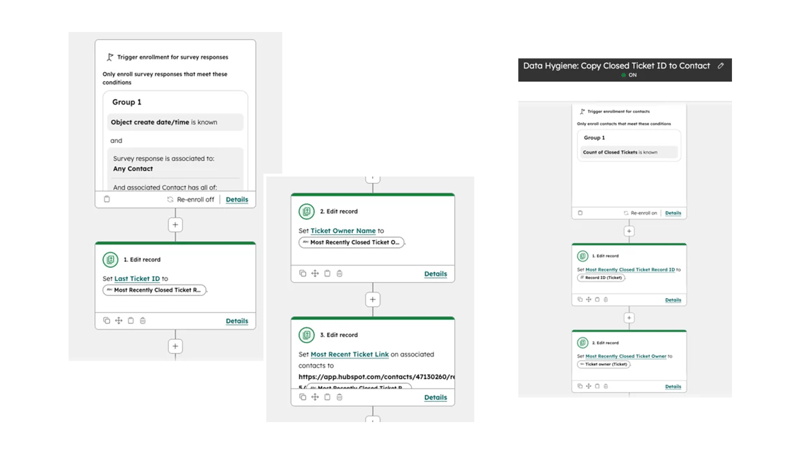
Two custom properties were added to the Contact record: Last Ticket ID and Ticket Owner Name.
The first workflow is contact-based and triggers when a Contact has a closed Ticket count. It copies the most recently closed Ticket’s Record ID and owner over to those Contact properties. This turns the Contact into a reliable staging point for the data that needs to travel downstream.
The Engine
The second workflow triggers on survey response creation. Because the survey response is associated to a Contact, it can now reach back through that Contact record and pull the staged Ticket data forward.
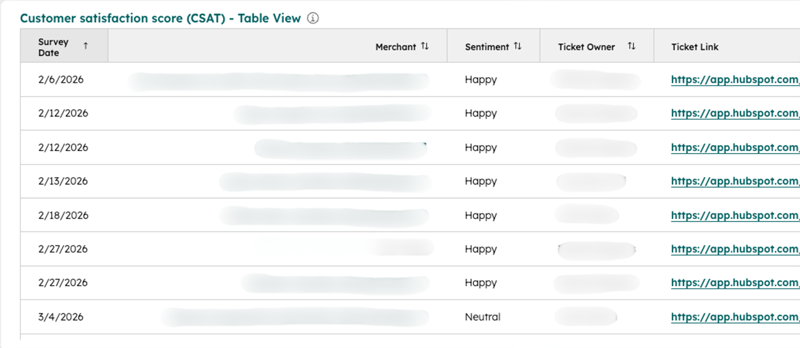
What comes out the other end is a survey record with full context: who handled the Ticket, a direct link to review it, and the CSAT score tied to that specific interaction.
The Impact
CSAT responses now surface the Ticket Owner and a direct link to the associated Ticket, making it straightforward to review any interaction that generated a score.
The team can use CSAT as an actual performance KPI — tracking results by rep, spotting patterns, and tying scores back to specific cases without any manual digging. What started as a reporting gap turned into a functional feedback loop for the whole service team.
“Oh, this is fantastic. Camille, this is what I was hoping we would get, but I wasn’t sure. I just thought no one’s filled it out.”
— Client Testimonial

FAQ
Why doesn’t HubSpot CSAT survey data include Ticket information by default?
Native CSAT surveys don’t dynamically pull the individual Ticket Owner's data onto the survey response record. This is why Ticket Owner doesn't show up in your survey reports by default.
The workaround is to use the Contact record as a bridge. Since the Contact is associated to both the Ticket and the survey response, you can use a contact-based workflow to copy key Ticket properties onto the Contact when a Ticket closes. Then a second workflow, triggered by the survey response, pulls that staged data forward and writes it to the survey record. The result is a CSAT response that carries full Ticket context, so you can report on performance by rep and trace any score back to the original interaction. As a HubSpot Diamond Solutions Partner, Simple Strat has built this solution for service teams that need CSAT to function as a real performance metric.
How do you use HubSpot CSAT scores as a team performance KPI?
HubSpot CSAT scores can be used as a team KPI by attributing each survey response to the ticket owner (via a Workflow that stamps the agent's name onto the response record), then building a custom report in Service Hub that breaks down average scores by agent over time. Pair the scores with response rate and ticket volume to avoid small-sample distortions, and combine with metrics like resolution time for a fuller performance picture.
The key is surfacing Ticket Owner on the survey response itself. Once that property is populated, you can build reports in HubSpot that break down CSAT scores by rep — tracking averages over time, flagging outliers, and giving managers a data-backed view of individual performance. Pairing that with the Ticket Link means every score is reviewable in context: you can open the Ticket, read the thread, and understand exactly what drove the response. Simple Strat builds this kind of operational layer for service teams that are ready to move beyond anecdotal feedback and treat CSAT as a real accountability tool.
When should you use CSAT vs. CES surveys in HubSpot?
For most service teams, CSAT is the right call when you want to measure overall satisfaction with an interaction or track rep performance over time. CES is better suited for evaluating how easy a specific process was. If your goal is team accountability and performance benchmarking, CSAT paired with the right workflow architecture gives you more flexibility. If you just need a quick read on friction at a specific touchpoint, CES is simpler to set up and the Ticket association comes built in.
CSAT (Customer Satisfaction) and CES (Customer Effort Score) surveys in HubSpot behave differently under the hood. CES surveys associate directly to the Ticket that triggered them, which means Ticket data flows through to the response automatically. CSAT surveys don't work that way. They associate with the Contact, not the Ticket, so that context has to be engineered separately if you need it for reporting.