Other B2B Services
Automating Vendor Commission Reporting in HubSpot
Simple Strat configured Custom Properties and HubSpot's Custom Report Builder to automatically tag commissioned services on deal line items and generate accurate vendor commission reports, eliminating the manual deal reviews that were costing the team 20–30 hours every quarter.

The Challenge
Tracking vendor commissions for specific services was a tedious, manual process for the client, causing:
-
Excessive time spent reviewing closed deals and identifying commissioned services
-
Frequent calculation errors, leading to inaccurate commission payouts
-
Delays in quarterly vendor payments due to disorganized data
The Solution
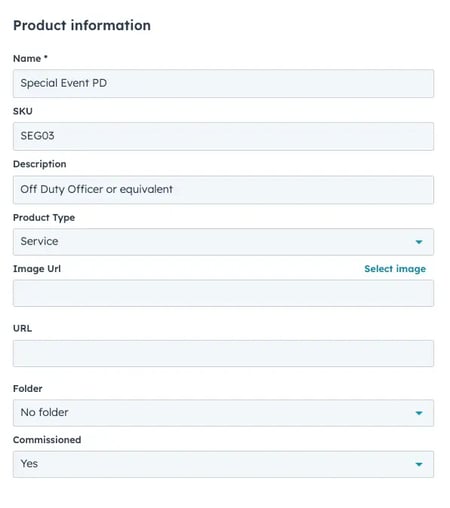
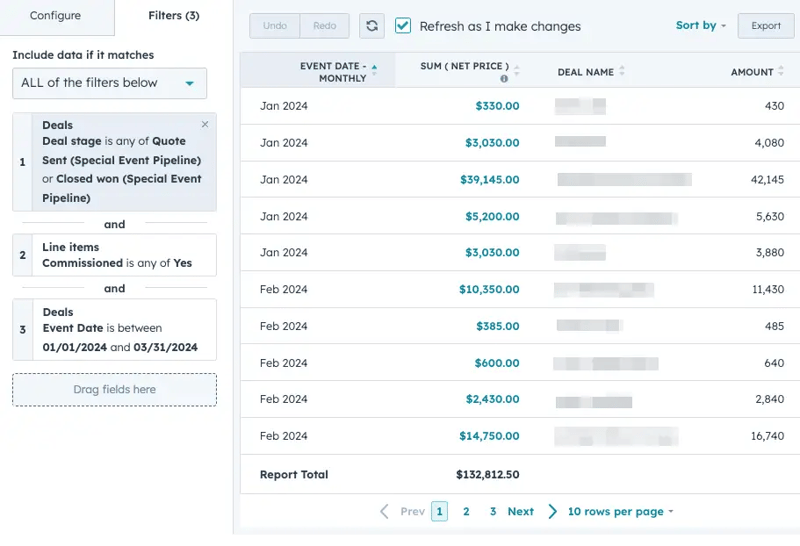
We built an automated reporting system within HubSpot that allows the client to tag specific services and generate commission reports effortlessly. This solution ensures that all relevant data is captured and calculated accurately, reducing manual effort and errors.
The Impact
The client can now:
-
Automatically track and report commissioned services without manual calculations
-
Save over 20 hours per quarter that were previously spent reviewing deals
-
Virtually eliminate errors in commission payouts, ensuring vendors are paid accurately and on time

FAQ
How can HubSpot automatically identify which services in a closed deal are commissionable?
A custom property on the product or line item record can flag commissioned services at the point of sale, so when the deal closes, HubSpot already knows which items need to be included in the commission report.
The key is tagging commissionable services in the product library before deals are created, rather than trying to identify them manually after the fact. Once the flag is in place, HubSpot's reporting tools can filter closed deals by that property and aggregate the relevant totals automatically. This removes the step where someone has to review each deal individually to determine what qualifies. For teams running quarterly vendor commission cycles, the time savings are immediate, and the accuracy improvement is significant, since the system applies the same logic to every deal without exception.
What's the best way to build a vendor commission report in HubSpot without exporting data to Excel?
HubSpot's Custom Report Builder can filter closed deals by commissioned line items, sum the relevant revenue, and display the results in a dashboard.
The report uses the commissioned property as a filter, then pulls deal date, net price, and deal name into a structured view that can be saved, shared, and refreshed on demand. Because the data comes directly from deal records, it reflects the actual state of the CRM rather than a point-in-time export that goes stale. Finance teams can run the same report every quarter with a single click and trust that the output is accurate. Simple Strat, a HubSpot Diamond Solutions Partner, designs these custom reporting systems for operations and finance teams that need reliable, repeatable data without adding manual work to their quarterly close process.
How do you reduce commission payout errors when your data is spread across multiple deals and time periods?
Centralizing commission data in HubSpot and applying consistent property-based tagging means every deal is evaluated the same way, removing the variability that causes errors in manual processes.
Commission errors almost always trace back to inconsistency: someone tagged a service differently than expected, a deal got missed in the review, or a calculation used a different rate than intended. When the tagging logic is built into the product library and the calculation is handled by the report rather than a person, those inconsistencies disappear. The report pulls the same fields in the same way every time, regardless of who created the deal or when it closed. For vendors and internal finance teams that depend on accurate quarterly payments, that consistency is what makes the process trustworthy.