Marketing Consulting & Services
Automated, Time Zone-Aware Event Reminders
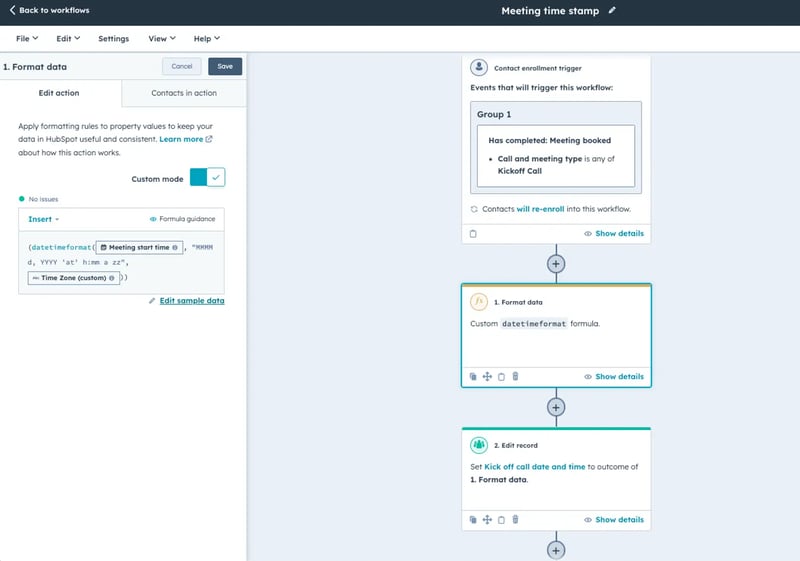
Simple Strat built a HubSpot Operations Hub workflow that detects each contact's time zone, formats meeting times accordingly using a custom datetimeformat formula, and delivers branded event reminders in the attendee's local time.

The Challenge
Our client, an events management company, needed a streamlined way to send personalized event reminders that reflected each attendee’s local time. They faced:
-
Inconsistent timing of reminders across time zones, leading to attendee confusion and missed meetings
-
Limited ability to automate communications, creating extra manual work for the team
-
Brand inconsistency, as they had no easy way to include custom event details in a professional format
The Solution
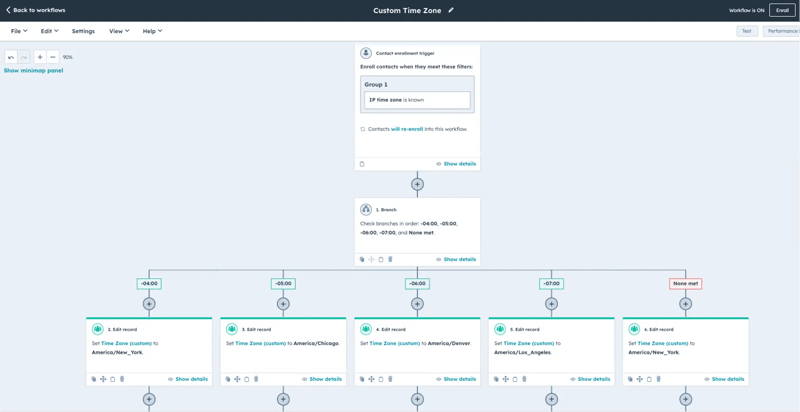
We implemented a custom workflow using HubSpot’s Operations Hub and Marketing Emails to format meeting dates and times based on each contact’s time zone. We set this up to detect and convert times to the attendee’s local zone, ensuring that reminders arrive in a relevant and familiar format, and it defaults to Eastern Time if the time zone is unknown.
The Impact
The client can now:
-
Deliver branded, automated event reminders with accurate, localized timing
-
Attendees receive reminders in their own time zones, improving engagement and reducing confusion
-
Internal teams spend less time managing time zone complexities or responding to issues, freeing them up to focus on core event tasks

FAQ
Can HubSpot send event reminders that automatically display in each attendee's local time zone?
Yes — HubSpot's Operations Hub Data Formatting, combined with a workflow, can detect a contact's time zone property and convert the meeting time before the reminder email is sent.
The workflow uses a datetimeformat formula to read the contact's stored time zone, convert the event time to that zone, and write the formatted value to a property that populates the email. If no time zone is on record, the system defaults to a specified fallback, so no reminder goes out with a blank or broken time field. For events teams managing attendees across multiple regions, this removes one of the most common sources of attendee confusion and missed meetings: a reminder that shows the wrong time.
What HubSpot features are needed to send personalized, time zone-aware event reminders at scale?
Operations Hub Data Formatting handles the time zone conversion logic, Marketing Emails deliver the personalized reminder, and Workflows tie the two together, triggering the sequence automatically when a meeting is booked.
The setup works by storing each contact's time zone as a custom property, then using an Operations Hub formula step to convert the event time before the email sends. The converted time is written to a contact property that the email template references as a personalization token. Because the whole sequence triggers off a meeting booking event, it runs automatically for every attendee without any manual setup per event. Simple Strat, a HubSpot Diamond Solutions Partner, builds these personalization workflows for events and client-facing teams that need their communications to feel tailored even when they're fully automated.
How do you handle time zone conversion in HubSpot when some contacts don't have a time zone on their record?
A conditional workflow branch checks whether the time zone property is known before applying the conversion. If it's empty, the system falls back to a default time zone so the reminder still sends correctly.
This is a critical detail that's easy to overlook: if the workflow assumes a time zone is always present and it isn't, the email either fails or sends with a blank field. Building a fallback branch into the workflow handles the gap gracefully — attendees without a stored time zone receive a reminder in the default zone, which is clearly noted in the email. Over time, as more contacts fill out their time zone through forms or CRM updates, the fallback cases decrease. The system handles both scenarios without any manual intervention.