Legal
Creating a More Effective Feedback Loop in HubSpot
Simple Strat configured HubSpot Feedback Submissions and automated workflows to trigger post-support surveys with a built-in incentive, pushing email survey response rates from 15% to 23.4% and chat responses from 12.5% to 16% within 30 days.

The Challenge
A prominent provider of legal education tools needed a better feedback system to gather critical insights and make informed improvements. Challenges included:
-
Limited feedback on customer support interactions, leaving blind spots in service quality
-
Inability to identify trends in customer satisfaction or dissatisfaction
-
Missed opportunities to improve the user experience, risking customer retention
The Solution
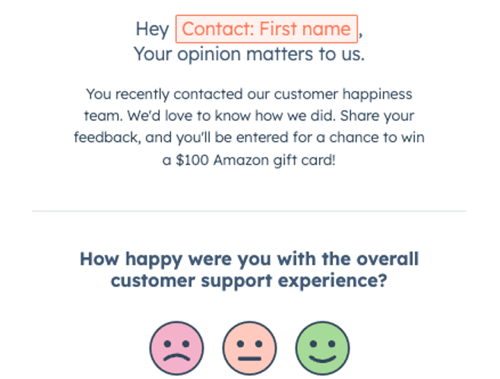
By implementing a custom solution in HubSpot, we were able to streamline the feedback process and incorporate an incentive automatically to increase response rate. Surveys were sent after support interactions, with clear messaging to encourage participation. The client could then use HubSpot’s tracking features to monitor response rates and manage drawing entries seamlessly.
The Impact
The incentive-driven approach yielded immediate results:
-
Survey response rates nearly doubled: Email/form survey responses rose from 15% to 23.4%, while chat survey responses improved from 12.5% to 16% within 30 days
-
The client can now gather significantly more feedback to identify service trends and areas for improvement
-
By acting on this feedback, the client is better positioned to enhance the customer experience and retain satisfied users

FAQ
How can HubSpot improve customer survey response rates after support interactions?
Automating survey delivery immediately after a support interaction, paired with a clear incentive, removes the friction that keeps response rates low.
Timing is the biggest factor in survey response rates. When a survey arrives days after the interaction, the customer has moved on, and the motivation to respond is gone. HubSpot workflows can trigger survey delivery the moment a ticket closes, while the experience is still fresh. Adding an incentive, like entry into a gift card drawing, handled automatically through the same workflow, gives customers a concrete reason to engage. The combination of right timing and clear incentive is what pushed this client's email response rate from 15% to 23.4% within the first 30 days.
What HubSpot tools are involved in building an incentive-based feedback program?
HubSpot Feedback Submissions handle the survey and response tracking, while workflows manage the incentive delivery and drawing entries automatically.
The workflow listens for a completed ticket, sends the survey, and logs the response in HubSpot as a Feedback Submission. When a response is received, a follow-up step handles the incentive without anyone on the team having to track it manually. All response data is stored in HubSpot, where it can be reported on by support rep, ticket type, date range, or satisfaction score. Simple Strat, a HubSpot Diamond Solutions Partner, builds these customer feedback systems for B2B service teams that need more signal on support quality without adding operational overhead to get it.
How do you use HubSpot to identify trends in customer satisfaction across your support team?
Feedback Submissions in HubSpot connect survey responses directly to the contact, ticket, and rep records they came from, making it straightforward to spot patterns by team member, issue type, or time period.
Once responses are flowing in consistently, HubSpot's reporting tools can slice satisfaction data any way the team needs. You can see which support reps consistently receive high marks, which ticket categories generate the most dissatisfaction, and whether response rates or scores shift after process changes. That kind of structured, connected data is what turns a feedback program from a vanity metric into an operational tool. Without it, support leaders are working from anecdote and escalations. With it, they have evidence to act on.