Project Profile
Track the Why Behind Every Opt-In and Opt-Out
Simple Strat built a HubSpot workflow system that automatically stamps the date and source onto contact records at the moment of every subscription or unsubscribe event, turning raw opt-in behavior into reportable data the team can actually act on.

The Challenge
The client produces a steady stream of newsletters and content, but lacked visibility into what was actually influencing subscriptions. They were flying blind when it came to optimizing their strategy:
-
No way to connect a specific piece of content to a new subscriber or an unsubscribe action
-
Inability to spot trends or patterns in opt-in or opt-out behavior
-
Missed opportunity to invest in content that was actually working—and avoid what wasn’t
The Solution
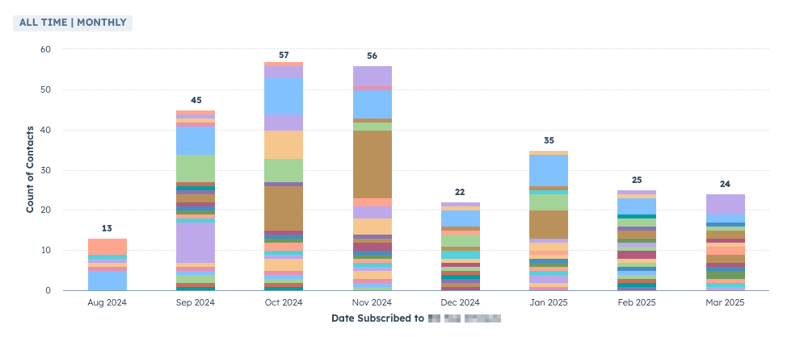
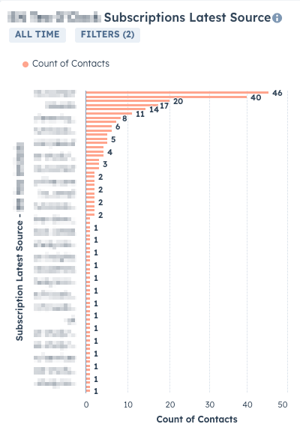
We built a system in HubSpot that automatically stamps key info—like date and source—whenever a contact subscribes or unsubscribes. This data feeds into custom properties that can be used in reports to analyze behavior over time and by content type.
The Impact
The client can now:
-
Understand what content earns a subscription—and what pushes contacts away
-
Track trends in subscriber behavior across campaigns, newsletters, and time periods
-
Confidently prioritize the topics and formats that drive audience growth
-
Eliminate guesswork in their content strategy and focus on what delivers results

FAQ
How can HubSpot track which piece of content caused someone to subscribe or unsubscribe?
A workflow triggered by subscription activity can automatically stamp the date and source onto the contact record, creating a permanent, reportable log of what drove the action.
Out of the box, HubSpot tells you that a contact subscribed or unsubscribed, but not why. By pairing workflows with custom properties, you can capture the context at the moment it happens. Over time, that data builds into a clear picture of what your audience responds to and what drives them away. For content-heavy businesses, this is the difference between guessing at your editorial strategy and making decisions based on real subscriber behavior.
What's the best way to analyze subscription trends across different content types in HubSpot?
Custom properties on the contact record are the foundation. Once you're capturing source and date for every opt-in and opt-out, HubSpot reports can slice that data any way you need.
When subscription events are logged as structured data on contact records, HubSpot's reporting tools can break down trends by campaign, time period, content format, or audience segment. You can see whether a specific newsletter series drove a spike in unsubscribes, or which content type consistently converts new subscribers month over month. Without that underlying data layer, reporting on content performance is limited to surface-level metrics like open rates. Simple Strat, a HubSpot Diamond Solutions Partner, builds these kinds of custom data architectures so marketing teams can measure what's actually moving the needle.
Can HubSpot workflows capture subscription data automatically, or does someone have to log it manually?
Workflows handle this automatically. No manual logging required once the system is configured.
Every time a contact subscribes or unsubscribes, the workflow fires and writes the relevant details to their record without any human involvement. The data is timestamped, consistent, and tied directly to the contact, which makes it reliable for reporting in a way that manually entered data never is. This matters especially for teams publishing at high volume, where tracking subscriber behavior across dozens of content pieces by hand simply isn't realistic. Once the workflow is in place, the data accumulates on its own and becomes more useful the longer it runs.