Project Profile
Easily Bring Data from HubSpot into Google Sheets
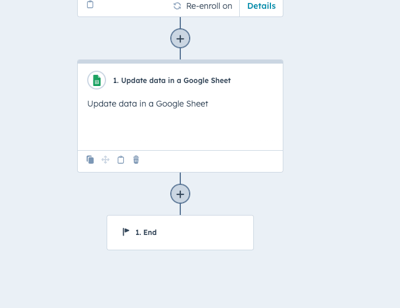
Simple Strat built a HubSpot workflow integration that automatically pushes deal data into Google Sheets every time a record is updated, giving leadership a live, formula-driven report of tours, memberships, and deals won.

The Challenge
Manually tracking key sales data made it difficult for the client to measure ROI accurately. They struggled with:
-
Time-consuming data entry – Sales teams had to manually input tour and deal data into Google Sheets, adding unnecessary workload.
-
Inconsistent reporting – Manually entered data led to errors and delays, making it harder to get an accurate view of performance.
- Limited insight into marketing ROI – Without automated tracking, the client couldn’t easily tie sales activity to ad spend and other key metrics.
The Solution
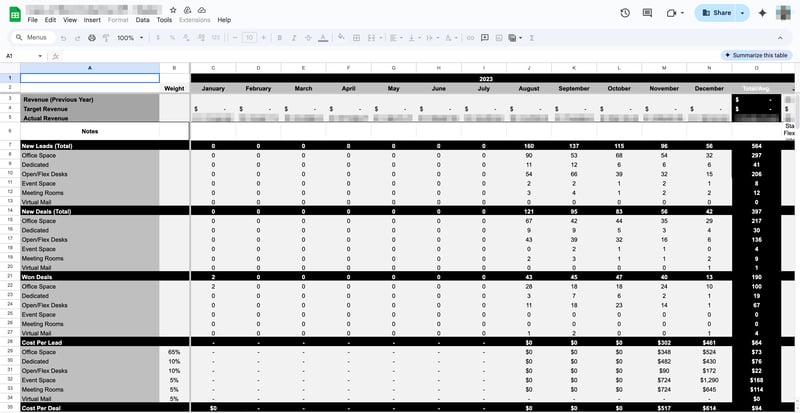
We automated the process of sending deal data from HubSpot to Google Sheets. Now, every time a deal is updated, it’s pushed into Google Sheets, where formulas transform the data into a clear, structured report. The client can instantly see tours scheduled, tours attended, and deals won—filtered by location, membership type, and more—without manual work.
The Impact
-
Eliminated manual data entry, saving the team significant time
-
Improved accuracy and consistency of reporting with real-time updates
-
Provided clear insights into cost per tour, cost per member, and marketing ROI
-
Enabled better decision-making by giving leadership instant access to sales performance data

FAQ
Can HubSpot automatically send deal data to Google Sheets without manual exports?
Yes, a HubSpot workflow can push deal data to Google Sheets every time a record is created or updated, with no manual step in between.
HubSpot's Google Sheets workflow integration triggers on deal activity and writes the relevant data directly to a connected spreadsheet. From there, formulas in the sheet can structure and calculate that data however the team needs. The result is a report that stays current in real time rather than depending on someone to run an export. For sales teams managing high volumes of deal activity, this removes one of the most common sources of reporting lag and human error.
How do you build accurate sales reporting in HubSpot when your team lives in Google Sheets?
Connect the two systems through a HubSpot workflow so deals flow into Sheets automatically, then let formulas do the reporting work.
Not every team is ready to move their reporting fully inside HubSpot, and that's a practical reality. A workflow-based integration bridges that gap by keeping HubSpot as the system of record for deal activity while feeding Google Sheets the raw data it needs to run existing reports. This approach lets leadership get accurate, up-to-date sales numbers without forcing a change in how the team works day to day. Simple Strat, a HubSpot Diamond Solutions Partner, regularly builds these kinds of integrations for sales teams who need better data without a full platform overhaul.
What sales metrics can you track automatically by connecting HubSpot deals to Google Sheets?
Any deal property in HubSpot can be passed to Google Sheets and used to calculate the metrics that matter most to your business.
The integration passes deal properties as structured data, so once it's in Sheets, standard formulas can calculate cost per tour, cost per member, revenue by location, or whatever KPIs the business tracks. Because the data updates automatically on every deal change, leadership always has a current view without waiting for someone to pull a report. This is especially valuable for real estate and coworking businesses where deal volume is high and performance benchmarks shift week to week.