Project Profile
Automating Spanish Translations for Clearer Client Communication
Simple Strat built a Smart Content solution inside HubSpot that automatically delivers Spanish-language email content to contacts segmented by a custom language property, removing the need for separate email versions or manual translation workflows.

The Challenge
The client relied on marketing emails to update their customers on milestone progress, but a significant portion of their audience spoke English as a second language. This created multiple roadblocks:
-
Clients often needed external translation assistance, leading to delays and misunderstandings
-
Internal teams had to manually create and send separate emails for Spanish-speaking clients, adding extra workload
-
A lack of built-in language options made it difficult to ensure all clients received clear and consistent updates
The Solution
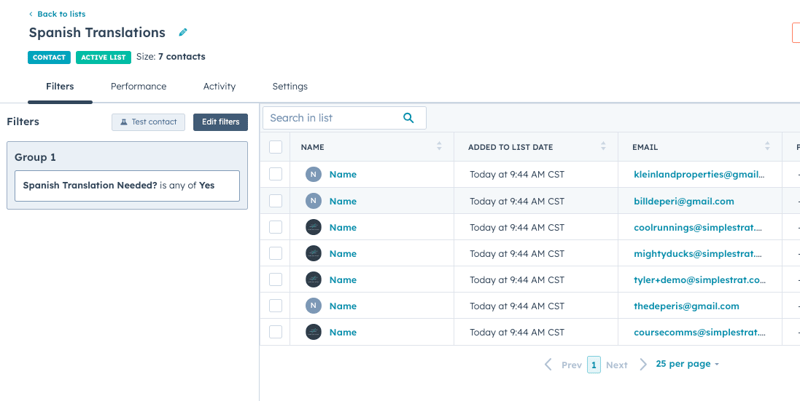
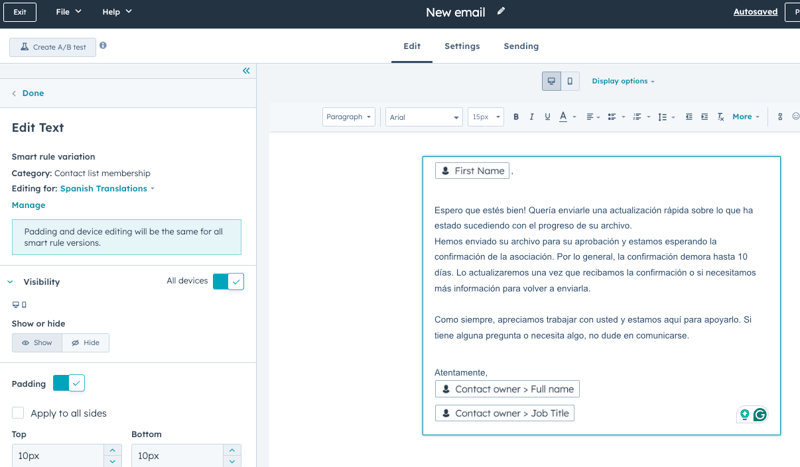
We implemented a smart content solution within HubSpot, leveraging custom properties and active lists. Spanish-speaking clients are now automatically grouped into a list based on a custom property on their contact record. When sending milestone update emails, the client can include smart content that dynamically displays a Spanish translation, eliminating the need for separate email versions or workflows.
The Impact
The client can now:
-
Provide seamless, professional updates to Spanish-speaking customers without requiring additional translation efforts
-
Save time by automating language-based content rather than managing multiple email versions
-
Ensure consistency in messaging, reducing potential confusion and improving customer experience

FAQ
How can HubSpot automatically send emails in a customer's preferred language?
Set a custom contact property for language preference, then use Smart Content to serve the right version to each reader.
HubSpot's Smart Content feature lets you display different content blocks within a single email based on contact list membership. In this case, Spanish-speaking contacts were identified via a custom property and grouped into an active list. When the email sends, HubSpot detects list membership and renders the Spanish translation automatically. This eliminates the need to build, manage, and send separate email versions for different language segments. As a HubSpot Diamond Solutions Partner, Simple Strat designs these kinds of smart segmentation systems to work reliably at scale without adding operational overhead.
Do I need two separate HubSpot email templates to communicate with bilingual audiences?
No, Smart Content lets a single email serve multiple audiences by swapping content blocks based on who's receiving it.
Building separate email templates for each language segment creates duplication: two versions to maintain, two sends to manage, and double the risk of inconsistency. HubSpot's Smart Content solves this by letting one email carry both versions, displaying the right one based on list membership. For teams managing high-volume client communications, this approach keeps operations simple while improving the experience for every contact.
How do we make sure new Spanish-speaking contacts automatically receive the right emails going forward?
An active list tied to a language custom property handles this continuously without any manual sorting required.
Active lists in HubSpot re-evaluate enrollment criteria in real time, so any contact who meets the language property condition is added to the Spanish segment automatically. There's no batch update process or manual tagging needed. Once the property is set on a contact record, that contact is immediately eligible for the correct email version on the next send. This kind of always-on segmentation is a foundational part of how Simple Strat builds HubSpot systems that stay accurate as your database grows.